Xbox 360
159 archivos
-

Wasabi 360 Ultra Firmware
This firmware is for both Wasabi 360 Ultra (Phat) and Wasabi 360S Ultra (Slim). For installation and usage instructions, please refer to the user guide included in the zip.
Please be aware that this is a BETA firmware release. While we have done our best to rigorously test the firmware, there may be some bugs that have slipped through. If you have any issues with this BETA then please direct your queries to the Team Wasabi support e-mail: support@wasabi360.com
Change log
----------
- v1.3 BETA 2 (8/11/2012)
* Multi disc support for the DVDMenu system.
* Fix the missing last 4 digits ODD key "16D4S drives" from WASABI display information.
- v1.3 BETA 1 (12/3/2012)
* DVDMenu added - a graphical, skinnable, fully customisable on-screen menu system
* Eject processing tweaked
* Drive key is now displayed at the Wasabi version information screen
- v1.2 (25/2/2012)
* Automatic drive key extraction for Xbox Slim Liteon 16D4S drives added
* Dynamic AP25 responses based on disc profiling is now supported, allowing AP25
protected titles to function with the latest dashboard + console specific dae.bin updates
* AP25 topology data may be sourced from either the provided AP25 database or from within
iXtreme LT v3 ISO files
* Support for GPT partitions added, enabling support for drives larger than 2TB
- v1.1 (19/10/2011)
* Added advanced configuration options, manipulated through the new wasabi.xml file
* Changed the default boot behaviour - now the previously used ISO file will be automatically
mounted at boot, rather than the "mixed media" ISO list. Simply "eject" Wasabi in the usual
manner in order to bring up the ISO list after boot. This behaviour can be configured (and
thus reverted to the previous system) via wasabi.xml
* Added an update blocker feature, which prevents Xbox dashboard updates from being initiated
from a Wasabi mounted ISO file. This is enabled by default, although it can be configured
via wasabi.xml. We recommend that you leave this enabled at all times; if you wish you update
your Xbox dashboard then you should do so with Wasabi in pass-through mode, launching the
update either from Xbox live or from a USB stick
* The Wasabi ISO list has always had a feature where the most recently mounted ISO will be shown
at the top of the list. From this release, this feature can be toggled on and off via wasabi.xml
* You can now specify any arbitrary folder on your HDD from which Wasabi should list ISO files,
once again configured via wasabi.xml
* Various stability and performance tweaks
- v1.0 (3/10/2011)
* Initial firmware release
-
.ff Viewer
.ff Viewer! Edit patch_mp, single player, files etc.
by MörderVonJuden.
-
360 Content Manager
360 Content Manager for JTAG & RGH 360s. Created by xamphear.
What This App Does:
* Browse 360 files on your PC by their real info, like game name and package title. * Unlock XBLA, DLC and Avatar files downloaded from Xbox Live. * Upload files (XBLA, DLC, GOD, Avatar, Title Update) to your console over FTP with a single click. Files are automatically uploaded to the right folders. * Drag and drop files to other applications, if you'd prefer to use your own FTP client. * Organize a messy folder of downloaded content into 1 of many different directory styles. Restore the original filenames for XBLA and DLC files. * View the MediaID of Title Updates and GODs so you can match them, and search JQE and XBUC for matching TUs. * View the MediaID of ISO files. (Requires abgx360) * View the MediaID of default.xex files. * Browse your 360's hard drive directly, using FSD. This allows you to delete, unlock, edit and copy the contents of the 360's internal drive over the network. Please see the About box for credits and thanks. This app owes a lot to other more talented 360 hackers.
IMPORTANT NOTES:
* FTP Uploading works with all 360 homebrew packages: FSD, xm360, XeXMenu and the ftpdll Dash Launch plugin. -
360 Drive Switcher
Tool that allows you to prepare a firmware for a new drive on your Xbox 360.
How it works:
1. You dump the two drives firmwares you want to swap. 2. You hack the firmware of the drive you want to use. 3. Launch 360Drive_switcher and set it like this: + The firmware of the drive you don't want to use anymore in the "Original firmware file" + The firmware of the drive you want to use in "Destination firmware file" 4. Check the informations that the tool gives you 5. Click on "Generate..." Now, you have just to flash the new firmware created on the drive you want to use...and have fun.
by Soulheaven
-
360 Evolution
A revolutionary Xbox 360 editor which allows the end user to Display and Modify information contained within Xbox 360 Container (CON, LIVE, PIRS) files, Save Game files (Halo 3, Modern Warfare 2, etc.).
Requirements
* Hardware o Xbox 360 o XPort / XSATA - See CodeJunkies for further information. o XPort 360 / XPlorer 360 - Included in Download * Software o .NET Framework 3.5 - Built into application. Known Bugs
* Settings Background does not save and has been disabled. (Workaround: In the settings.xml file, add a complete filesystem path between <background></background>.) -
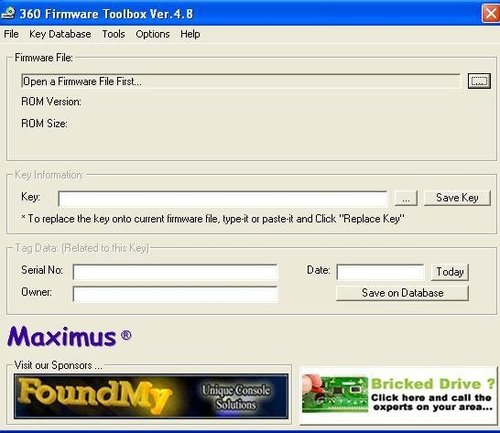
360 Firmware Toolbox
A graphical tool to handle several common dvd-drive firmware tasks. This is the better tool you will find.
You can copy-paste the keys from one firmware to another not matter if they are different vendor (samsung / hitachi / BENQ) and not matter the version of the FW
Allows SMART PATCH for rolling code firmwares (Hitachi 0078/0079) and also Direct Flash on all drives, even the nasty 78/79 drives.
RAWDUMP does not work fine with SIL chipsets yet, be aware of use the validate checksum feature to avoid bad dumps and bricks. We will be working on SIL chipsets later.
The flasher/restore appears to be rock solid now, also very easy to understand, so this could be the base to flash future firmware releases, even on the 78
FEATURES:
- Direct Dump and Direct Flash over all versions of GDR3120L drives even the 0078 FK drives. For 79 FK you will need aditional device attached to the drive. - Allow copy-paste of the keys between firmare not matter if they are crypted or not or if they are different vendor or even better, not matter which version of Fw (46,47,59,78 etc) - Do common firmware tasks with a mouse click - Supports Samsung and Hitachi firmwares All Versions - Shows Vendor, ROM version and also if its CRYPTED or NOT - Allow crypt or decrypt the files - Shows the 16 byte Keys not matter if the file is Crypted - Allows adding of TAGS to a KEY like Owner, Serial No, Date. (Dont worry, the tags are not saved onto firmware file) - Fully Integrated with Windows Context Menu (like winrar) - Fully Supports 512 KB firmwares (2 banks) INSTALLATION:
- Unzip contents on the folder you like - Open application and go to Options->Enable Windows Context Menu - Close application HOW TO USE:
- READ THE ATTACHED FILE LABELED TUTORIALS.TXT - To open a file you can just on Windows Explorer do Right Click and choose "Open with Firmware Toolbox", or you can first launch the application and do File-Open menu or simply drag a file from your browser to the application. - To encrypt or decrypt a file just open it as above and click the button encrypt or decrypt. - To replace a key just type it or copy-paste it into the key textbox and click on "Replace Key" - To set or replace Tag Data just type it into the Tag Data Section "Save Tag Data". This Tag Data will be show every time you open a file that have the same key. Useful to identify an Owner's Key THANKS TO
C4E, Seventhson, garyopa, geremia, birdy, Loser, modfreakz, uberfry, Tecno Devices and all others on xboxhacker.net
by Maximus.
-
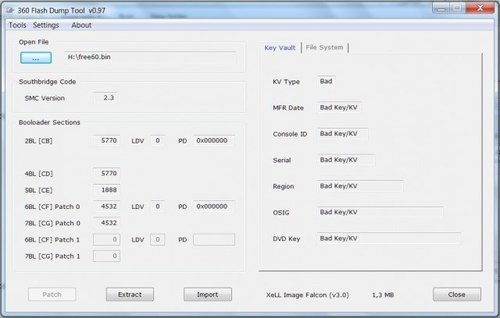
360 Flash Dump Tool
A tool for use with NAND dumps. It will provide all the information about your NAND, and the Key Vault which is contained within. It can also decrypt/encrypt and import/ export various elements of your NAND such as the SMC.
-
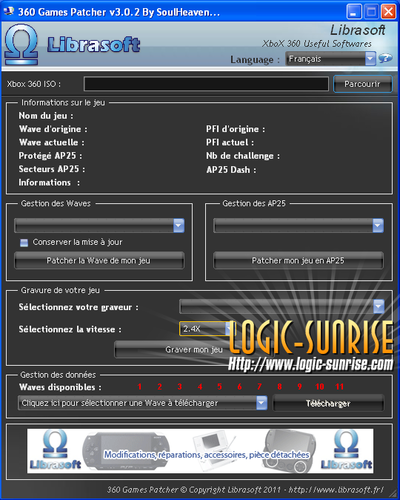
360 Games Patcher
oulHeaven Logic-sunrise and Librasoft are pleased to introduce a new software design that allows you to patch yourself all your games easily protected AP25.
For the occasion, as our famous software Waves 360 Patcher becomes 360 Games Patcher.
The software automatically detects if your game is protected AP25, and offers one-click to patch it to make it operational on your dashboard.
ATTENTION: We will select the correct version of dashboard so that your backup is functioning properly.
-
360 HackBox Lite
Una aplicacion todo en uno para la instalacion y modificacion de una Xbox 360 compatible con el hack JTAG o ResetGlitch (1 y 2).
[OFRECE LO SIGUIENTE]
- Primera aplicacion en ofrecer un entorno Lite y sencillo de utilizar - Botones y distribucion inspirados por J-Runner cual su enfoque es facilitar y trabajar en flujo - Simplicidad en los procesos y botones dehabilitados hasta que no cumpla ciertas carateristicas se pueden usar.Eg: No puedes "Crear Imagen Hack" si no tienes una NAND abierta y la CPU Key valida. - Una sola configuracion para todo en el panel del "Interfaz de Operaciones" - NandPro2.0b para placas Corona y ahora permite parchar el puerto de enlace LPT - Barra de progreso para descargas ( procesos de nand no aplican ) - Un log de eventos para monitorear lo que sucede durante las tareas [CARACTERISTICAS]
- Leer NAND dos veces con solo presionar un boton donde reconcera el FlashConfig, Placa y si es JasperBB automaticamente configura para leer 66MB en vez de 16MB - Al Abrir una NAND Manualmente hackbox automaticamente buscara leer la CPU Key en el mismo directorio donde esta tu nand en "cpukey.txt", "fuses.txt", "KV_Info.txt". - Programardor de CPLD semi-automatico con solo escoger el fichero a instalar - Creador de Xell de ambos JTAG y Glitch donde utiliza Ibuild para crear imagenes JTAG al momento. No olvides dar check a Utilizar AUD_CLAMP si asi se desea. El proceso de creacion de ECC ya es automatico. Al finalizar te dira si existen bloques daÒados en area de XeLL para que el siguiente proceso lo contemple. - Flashear Xell se encargara de flashear XeLL por ti y si existen bloques daÒados esto automaticamente se corregir·. - Creacion de Imagen Hack que utiliza xeBuild v1.04 y DashLaunch v3.02. Es automatizado de acuerdo a tu nand actualmente abierta. Tambien genera una carpeta con el numero de serie y placa con tu respaldo de la tarea actual. Agrega (nand de origen, imagen hack, cpukey.txt, KV_Info.txt ) - Copiar a USB con RawFlash. Si deseas terminar tu flasheo desde Xell, esto copia lo necesario a tu USB! - Guardar Respaldos a *.zip. Guarda tus respaldos a un *.zip y te pide donde lo deseas guardar. Incluye todo lo que genero "Crear Imagen Hack" (nand de origen, imagen hack, cpukey.txt, KV_Info.txt ) - Flashear Imagen Actual permite escribir a NAND la imagen que abriste. !!CUIDADO!! no verifica nada, solo escribe a NAND al presionar el botÛn. - Instalar Avatars permite ya sea descargar o bien copiar el dash update en *.zip y agregarlo si es que cumple con el MD5 en la base de datos. - Copiar Avatars permite copiar avatars disponibles y previamente instalados desde "Instalar Avatars" a una USB para completar tu actualizacion/instalacion de FreeBoot. - Agregar Kernel te permite descarga o bien selecionar tu dash update en *.zip e instalar el pirs que ocupa xeBuild para generar tu imagen hack. - Editar el launch.ini ( es un editor austero y solo trae opciones comunes ) - Descargar CPU Key y flashdmp.bin desde XeLL directamente desde tu pc. No necesitas especificar IP ni nada pues detecta la IP de la PC donde se ejecuta 360 HackBox y lo determina como IP de Base y de ahi inicia la busqueda cual puede tardar de 3 a 6 segundos en encontrar XeLL y descargar lo especificado. - Tambien cuenta con actualizacion en Linea. Al iniciar 360 HackBox Lite v2.0 buscara actualizacion y si es encontrada te preguntara si gustas actualizar y el proceso tambien es automatico. ( Por fin!!! ) [CREDITOS]
Gracias a Swizzy por ayudar con codigo que forma parte de esta herramienta! Gracias a blaCkat por ayuda externa e informacion sobre Squirt Team! Gracias a Tiros È GliGli por el trabajo original del RGH Gracias a cOz por su parchador universal del SMC Gracias a Blackaddr por su SMC_Util v1.2 Gracias a todos los desarrolladores de Xecuter developers y testers oficiales Gracias a Equipo Squirt, Xecuter, Matrix, GlitChip por su hardware y software Gracias a www.elotrolado.net por tener foros tan ˙nidos en fraternidad. Estoy triste por el sistema que manejan en los foros de TX, son una lastima. 360 HackBox Lite v2.0 fue creado por nknave84 2012! -
360 Modification Disc
Features:
- Complete Modding Solution for Samsung/BenQ/Lite-On - iXtreme v1.6 (12x) Firmware - 0800 Mode for Samsung/BenQ/Lite-On (thanks to iXtreme v1.6) - Supports Samsung TS-H943 - Supports BenQ VAD6038 - Supports Lite-On DG-16D2S - Supports Previously Modded Drives - Supports Previously Spoofed Drives - 100% DOS Based Dumping & Flashing - Supports FAT32 & NTFS Filesystems (WinXP/Vista 32-Bit & 64-Bit) - Fully Automatic Dumping & Flashing - Step-by-Step Instructions - Backup of all drive-related files to HDD NOTE:
This disc requires a VIA VT6421 PCI SATA (or compatible) card installed, and an NTFS or FAT32 formatted HDD/partition as the 'C:' drive for this disc to work properly.
NOTE 2:
This disc *might* work with other types of SATA chipsets/cards, but it is recommended that you use a VIA VT6421 SATA card.
NOTE 3:
USB serial adapters are NOT compatible with this disc!
Usage:
Make sure you have a VT6421 (or compatible) PCI SATA card installed in your PC Burn this ISO, and boot this disc in your PC Follow the prompts to mod any Samsung, BenQ, or Lite-On XBOX 360 DVD-ROM drive All firmware dumps, modified firmware, and other files related to the drive being modified will be placed in the following directories on your 'C' drive: Samsung TS-H943 - C:\SAMFILES BenQ VAD6038 - C:\BENFILES Lite-On DG-16D2S - C:\LONFILES
Disclaimer:
I take absolutely no responsibilty for the use of this disc by anyone. Use at your own risk!
Special Thanks & Credits:
Team HyperX - For the awesome iXtreme v1.6 firmware used by this disc FreeDOS Project - For the FreeDOS Operating System used by this disc Winternals - For the NTFSDOS driver used by this disc (NTFS Support) Dennis Bareis - GETRESP (used to input variables into MS-DOS batch files) Franck Uberto - XMSDSK (used to create a RAMDISK under MS-DOS) Geremia, Modfreakz, Podger, Redline99 and Tiros - DOSFLASH Caster420 - Firmtool (Samsung/BenQ/Lite-On iXtreme firmware generating) TJ - DVDKey & DummyGen (used to dump firmware for the Lite-On drive) DuggyUK - For information on El Torito HDD Emulation used by this disc by FrostyTheSnowman.
-
360 Modification USB Drive
Features:
- Complete Modding Solution for Samsung/BenQ/Lite-On - USB Version (disc based version available) - iXtreme v1.6 (12x) Firmware - USB Flash/Thumb Drive Bootable! - Powerpoint-style GUI - Supports Samsung TS-H943 - Supports BenQ VAD6038 - Supports Lite-On DG-16D2S 74850C - Supports Lite-On DG-16D2S 83850C - Supports Previously Modded Drives - Supports Previously Spoofed Drives - 100% DOS Based Dumping & Flashing - Fully Automatic Dumping & Flashing - Step-by-Step Instructions - Backup of all drive-related files to USB flash/thumb drive! Notes:
This software requires a VIA VT6421 PCI SATA (or compatible) chipset This disc *might* work with other types of SATA chipsets/cards, but it is recommended that you use a VIA VT6421 SATA card. USB serial adapters are NOT compatible with this disc! Usage:
- Follow the tutorial included in this package to create your 360 Modification USB Drive - Insert your prepared USB flash/thumb drive into your PC (360 Modification USB Drive) - Restart your PC, and boot from your USB flash/thumb drive (USB boot method varies between PCs) - Follow the prompts to mod any Samsung, BenQ, or Lite-On XBOX 360 DVD-ROM drive - All firmware dumps, modified firmware, and other files related to the drive being modified will be placed in the following directories on your USB flash/thumb drive: Samsung TS-H943 - SAMFILES BenQ VAD6038 - BENFILES Lite-On DG-16D2S Revision 74850C - LONFILES\74850C Lite-On DG-16D2S Revision 83850C - LONFILES\83850C - Advanced menu available, place all firmware files intended (by the user) to be used with this menu in the 'CUSTOM' folder in the '360 Modification USB Drive Files' folder within this package WARNING: THIS OPTION IS FOR ADVANCED USERS ONLY! BE ABSOLUTELY SURE YOU KNOW WHAT YOU ARE DOING BEFORE USING THIS OPTION!
Disclaimer:
I take absolutely no responsibilty for the use of this software by anyone. Use at your own risk!
Special Thanks & Credits:
Team HyperX - For the awesome iXtreme v1.6 firmware used by this software FreeDOS Project - For the FreeDOS Operating System used by this disc Dennis Bareis - GETRESP (used to input variables into MS-DOS batch files) Franck Uberto - XMSDSK (used to create a RAMDISK under MS-DOS) Schtrom, Geremia, Modfreakz, Podger, Redline99 and Tiros - DOSFLASH Caster420 - Firmtool (Samsung/BenQ/Lite-On iXtreme firmware generating) Kenneth Silverman - KPNG (viewer application used for all display screens) Team Modfreakz - Bootable USB Drive Creator Tool (used to prepare USB drive) Klutsh (Creator of iPrep) - LiteTool (used to prepare Lite-On DG-16D2S firmware) Shinho - For my awesome new logo! (FrostyTheSnowman w/USB Drive & DVD-ROM)
Special Thanks to the following beta testers:
2green whistler herbert7890 thechilde Phuncz dokworm bamma by FrostyTheSnowman.
-
360 Multi Builder
An all in one nand builder by Rogero.
With this tool, you will be able to create ecc/freeboot/ggboot retail images for your Xbox 360.
360_Multi_Builder_v0.95a on 01/07/2012
——————————————————————
– Bug fixed in Xell/ECC build script that only affects new Xell image generation. – The 15574 Dash JTAG/RGH/RETAIL Images created with v0.95 are not affected at all. 360_Multi_Builder_v0.95 on 23/06/2012
——————————————————————
– Updated xeBuild to v1.03.512 with support for Latest Dash 15574. – Updated Dashlaunch to latest version 3.02 – Updated the ECC/Xell script to detect latest un-glitchable Boot-Loaders. – Added Trinity boot-loader ver 9231 to allow for 15574 Retail Image Creation. – To create 15574 Retail Images for other models latest BootLoaders must be added. – N.B: – – 15574 image creation is only possible with an already extracted CPU key. – – The ECC/Xell script cannot create a Xell image from a 15574 nand dump. -
360menu
Aplicación para Xbox 360 que hace de launcher de otras aplicaciones, emuladores y demás.
-
360mpGui
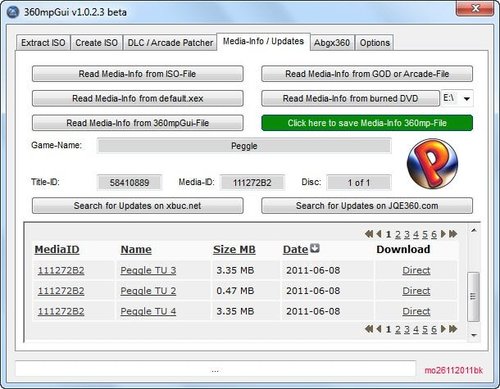
360MPGui can read the Title Update / Media ID from an ISO, Default.xex, GoD (Games on Demand) or Arcade game.
This makes it easy for you to findout the Title Update ID and Media of your game so you can download the correct one, 360MPGui can also check the Title Update ID and Media ID of a downloaded Title Update.
Aside from its ability to help you manage and obtain title updates 360MPGui can also extract ISO's, create ISO's and provide information on the game, such as the dashboard version it requires to play and the region it is locked.
The tool also has the ability to manage arcade games / DLC and unlock them for use if required.
-
360WavesPatcher
The 360WavesPatcher program allows us to patch the game on any wave.
With a few clicks, we can poll the game so that it is compatible with our firmware.
-
abgx360
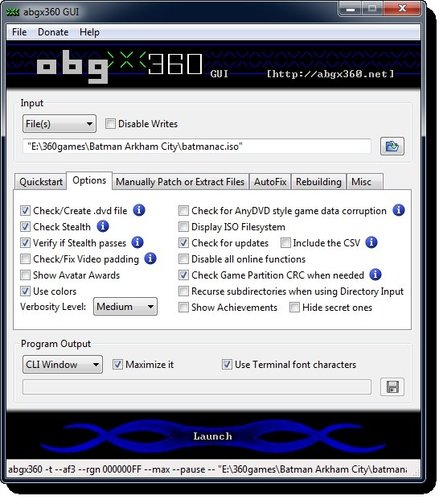
abgx360 es una aplicación para Windows, macOS y Linux para el parcheo de imágenes de juegos en formato ISO para Xbox 360.
abgx360 es una aplicación creada por Seacrest y actualizada por Hadzz.
-
Altus - Xbox Package File Manager
Altus is a plugin based application for manipulating Xbox package formats. Currently there is no ability to add/remove files, although the structure is in place, just need the plugins to support it. I started writing this program because every time a new development was made it spawned off a new program, we have quite a lot of programmers on the scene if they're all writing the same thing we're just wasting time.
Included Plugins:
ImageReader Plugin - Reads any ISO/360/BIN/TAO Xbox image, it will read a burnt Xbox DVD in a standard DVD drive, plus it will unlock and read from original Xbox drives. BF Plugin - Reads King Kong .bf files XZP Plugin - Reads .zxp format (mostly noticed on the Kiosk disc) XIP Plugin - Reads .xip files from the original Xbox Credz:
XIU for CVS hosting and coding help, best C# programmer I know :) th0mas for making the BF format understandable for me! TheSpecialist for a lot of hard work in the DVD firmware thread, without him the ImageReader would only be half what it is now by DarkNeo & XIU
-
Aurora
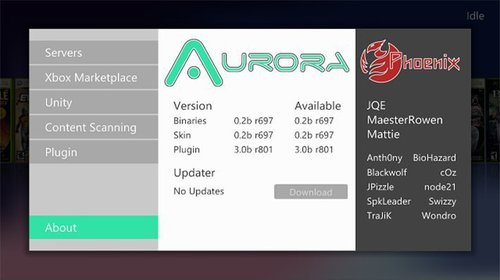
Dashboard alternativo para las Xbox 360 con RGH.
After the longest wait ever (more than a year since our preview post), we have Aurora 0.7b for you to enjoy! It contains some bug fixes and some exiting new features and improvements, big and small:
Profile / Disc Panel New CoverFlow Layout 'Minimal' Disc Number Indicator and Title Sort RSS Feeds Customizable Background Animation Profile Selector / Auto Sign-in at boot Title Specific Settings Saved Game Manager Temperature Graph Utility Scipts engine improvements New Skinning Features (QuickView Settings, Avatars, Video's, etc) And last, but not least, Freestyle Plugin has been rebranded/replaced:
NOVA, including a new WebUI -
AutoGG
El AutogGG es un programa que principalmente nos ayuda con un proceso practicamente automatizado a:
- Leer la Nand de la Xbox. Autodetecta el modelo. - Generar la Nand para cargar el Xell en la consola y asi obtener su Cpukey. - Una vez obtenida la CpuKey.Generar la imagen Jtag/Rgh(Glitch)/Retail, - Flashear la Nand generada a traves de programador o por software (Xell o Dash) Pero el AutoGG ademas nos permite muchas mas opciones (Addons)
- Cambiar las Temperaturas de los sensores de la consola. - Cambiar los datos de la consola: Num.Series, Tipo de Lector (Osig), Region y DvdKey. - Mapear/Desmapear Bad Blocks. - Inyectar/Extraer Datos especificos de la consola para reparar Nands corruptas, - Generar NandXell y Xebuild sin dump previo usando la Cpukey. - Desencriptar el X-Val para comprobar las marcas que tiene nuestra consola por parte de Microsoft. - UnCripple para tratar de desmarcar la consola, - Hacer solo una lectura parcial de la Nand de solo 1Mega para luego leer el resto a traves de Xell y finalmente fusionarlas para obtener la Nand completa de manera mucho mas rapida, (Recomendado en lectores de Nands lentos LPT) - Explorador de Ficheros Nand. - Analisis de Marcas (Secdata) en Nand. - Funcion de actualizacion automatica. - Descarga automatica de Dash FileSystems. - Descarga automatica de $ystemfiles para actualizacion de Avatars. - Programacion del Glitch Chip a traves de LPT y USB (Nandpro&Squirt). - Ventana de comandos para el Nandpro . - Comparacion manual de hasta 3 Nands. - Opcion de subir carpetas al Hdd interno de la consola por FTP.(Boton FTP Xbox) - Descarga,instalacion de Freestyle, Apps y EMulaDORES ... por FTP.(Boton FTP Xbox Apps) - Descarga,instalacion,ejecucion de las principales PC-APPS. - Opcion de usar Base de Datos Online para respaldo de Cpukeys. Util para recuperar consolas Brick si perdimos los datos. - Visor de Imagenes de esquemas de instalacion de chips , flashers ... - Y mas ... AutoGG es una aplicación creada por blaKCat.
-
AutoHacker
AutoHacker is an app I wrote which helps automate the proccess of SMC/JTAG Hack (on nand-related stuff only, of course).
FEATURES:
Motherboard Autodetection CB version / exploitability Autodetection Reads NAND two times (or part of it if we are using a BB Jasper) Compares the two backups, if they are identical, it saves them in a folder with a name of our choice. Extracts KV and ConfigBlock from the NAND Backup. Patches previously extracted KV and ConfigBlock in to the correct version of XBReboot (which is also autodetected). Writes final image to NAND memory of our console. Can also erase NAND (or part of it, if we are using a BB Jasper) Can also write original backup into NAND. It can also be used regardless of JTAG Hacking in the following ways:
Nand Dump Nand Compare Nand Write (any .bin image) It uses a full (custom) GUI which saves as from typos or mistakes which can be done by manually typing in commands. It also saves as from looking up to Guides to determine the correct NAND addresses which are varied along with the motherboard revisions, since AutoHacker knows the motherboard we are working on, if it is exploitable etc. If something is not right (CB not exploitable / we have not patched XBR / we have not two identical backups) it does NOT overwrite our NAND. ;D
NOTICE: This program DEPENDS on NandPro(info) and does NOT replace it.
I will update the app regularly, fixing bugs and adding features. Of course, each time a new XBR comes out, AutoHacker will need to be updated (this goes without saying).
-
benTool
benTool is a 16-Bit application used for patching iXtreme LT firmware for use in flashing BenQ drives only.
Whats New:
- Updated FW detection
- Fixed logging option
Thanks to:
Everyone that make this all possible.
Usage:
Make your iPrep stick as you normally do, replace BENCFW.BIN in the CFW folder on the USB stick
with ix LT v1.x renamed to BENCFW.BIN, open Ben.bat in notepad or any other text editor, replace
FIRMTOOL BACKUPS\%1\%2\BENOFW.BIN BACKUPS\%1\%2\BENCFW.BIN
with
BENTOOL BACKUPS\%1\%2\BENOFW.BIN BACKUPS\%1\%2\BENCFW.BIN
or
BENTOOL BACKUPS\%1\%2\BENOFW.BIN BACKUPS\%1\%2\BENCFW.BIN BACKUPS\%1\%2\LOG.TXT
The second line with save a txt file containing all the important data from the OFW.
place bentool.exe in the root of the USB stick.
DISCLAIMER:
ANY USE OF THIS PROGRAM IS YOUR OWN RISK
THIS PROGRAM HAS NOT BEEN EXTENSIVELY TESTED.
A CHECK HAS BEEN INPLEMENTED TO PREVENT ERRORS BUT I CANNOT GUARANTEE IT.
None of the contributing programmers shall be held responsible for any
damages that may be caused by the use of benTool.
-
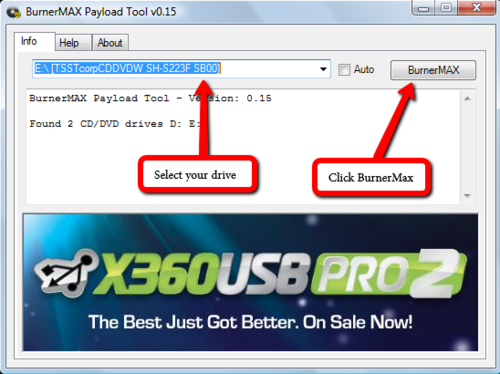
BurnerMax Payload Tool
C4Eís BurnerMAX Payload Tool in association with Team Jungle & Team Xecuter
---------------------------------------------------------------------------
Official release of the BurnerMAX Payload Tool - works with most MTK chipset based DVD burners (Liteon etc)
- No need to flash burner firmware. Delivers a realtime payload to increase capacity of DVD+R DL discs to support XGD3
- Support for stock iHas B, C, and D burners, all makes and models
- Support for many of the Liteon iHAS Clones
- Supports many other mnodels such as ASUS, Samsung, Pioneer and many others
- Supports many Liteon and Samsung USB External Burners
- Supports many Liteon IDE Burners
- Supports any disc burning software - we recommend iMGBURN
How it Works
-------------
Load your favorite burning software. Insert your blank DVD+R DL disc. Send the BurnerMAX Payload. Re-select your drive in the burner software and the capacity will be increased.
You will need to send the BurnerMAX Payload evertime you insert a blank DVD+R DL disc.
Special vendor specific commands are sent to examine in realtime the drives custom registers, searching for specific DVD+R DL blank media capacity and layer capacity parameters.
If found these registers are modified using another set of vendor specific commands.
Due to the use of stock firmware and different burner makes and models, any settings the burner has play a more important role.
For iHas burners B, C and D, recommended settings are:
Force Hypertuning - Enabled
Online Hypertung - Disabled
Smartburn - Enabled
Overspeed - Enabled
OPC history - Do not clear
Results may vary depending on hardware and disc brand.
Verbatim DVD+R DL (Singapore Manufactured) Blank Discs are recommended for best results.
I would like to wish everyone a merry xmas and a happy new year - many more goodies are coming......
Thanks go to Team Jungle for their hard work and efforts in the development process.
Thanks also go to Team Xecuter for their support to this project.
I wish to dedicate BurnerMAX Payload Tool's release to the victims of the Connecticut school massacre and the bravery of the school teachers involved who saved many lives.
Changelog
---------
v0.15
- First release
-
CONcept
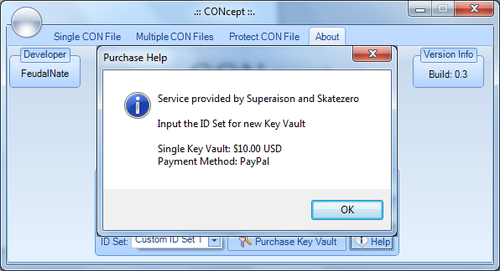
CONcept is a Xbox 360 NXE resigner used for resigning saves and other files for the xbox 360.
Features
Check for Updates 3 ID Slots for frequently used profiles Extract/Inject files Resign Multiple Files at a time Recognizes game and name of the File Protect Container File Plus others IMPORTANT NOTE: This program well set off a false alarm for some Anti-Virus Scanners.
-
Connect360
Application for macOS. It's allows users to stream their iTunes music library, iPhoto photo library, and movies to their Xbox 360, similar to Windows Media Connect.
* How do I connect?
Ensure that no firewall is active on your Mac and that "Access Control List" is turned off in Connect360's settings (or add your Xbox's IP to it).
Go to the System->Computers section in the Xbox menus and make sure you disconnect from all computers.
Restart the Xbox360. Next, go to the Media->Music->Computer section and answer Yes when prompted regarding the Windows Media Connect software.
* How can I stream videos to my Xbox 360?
Connect360 will find and share WMV video files in your Movies folder. Please note that the WMV file must contain a WMV video track and a WMA audio track. Other codecs will not currently work with the Xbox 360 and therefore will not be shared by Connect360.
* Connect360 is only showing some of my songs and photos!
The unregistered version of Connect360 is limited to 100 songs and 100 photos. This is not a bug. Once you register Connect360, the limitation is removed.
* My iTunes Music Store purchased songs aren't listed on my Xbox 360!
Songs purchased from the iTunes Music Store are DRM protected and the Xbox 360 does not support the iTunes (Apple) DRM, therefore these songs cannot be played back on your Xbox 360.
A workaround is to burn these songs to an Audio CD using iTunes and then re-import them into iTunes as MP3s.
* My iTunes or iPhoto Library is not found
If your iTunes or iPhoto library is not found, you can create an alias pointing to it named "iTunes Music Library" in your Music folder. For iPhoto, create an alias named "iPhoto Library" in your Pictures folder.
* My Xbox is detected but it says that it is "Unauthorized"
If your Xbox 360 appears as unauthorized in the Discovered Devices section of Connect360, you will need to either disable the Access Control List in Connect360's Settings or add the Xbox's IP or IP range to it.
* Ports 1900 and/or 9335 are in use error
If you get a dialog stating ports 1900 and/or 9335 need to be made open before you can use the application, likely you have another application using one of the ports. The most likely one is TwonkyMedia (using port 1900 for SSDP) and you will need to quit/uninstall it.
* I am using a firewall on my Mac, Connect360 won't work?
If you have the Mac OS X firewall active on your Mac, Connect360 will remind you and help you configure it. If you are using other firewall software, you will need to open TCP port 9335 and UDP port 1900.
* I'm using a switch or more than one router, will this work?
Ensure that the Xbox 360 and the Mac running Connect360 are connected to the same network router or hub. This is necessary in order for broadcast messages to be exchanged between the two. Note that Connect360 may not work with a network switch, you need a hub-type device or a switch that supports broadcasting. You may also need to have both the Xbox and Mac on the same interface type (wired versus wireless, but not a mix of the two), depending on your router's capabilities.
* I have a Linksys WRT54G and my Xbox 360 can't see my Mac!
Ensure you are running the factory firmware on your router. Using custom firmware may not work. Resetting the router to factory settings may help as well.
* Can I use a cross-over cable to connect the 360 directly to the Mac?
No, this configuration will not work. You must use a hub or router to connect the Mac and Xbox 360.
* Will Connect360 work over a wireless range extender?
It may not, unless your extender is able to correctly forward broadcast packets (as it should).
* Other troubleshooting tips
We recommend using "Automatic" (DHCP) network configuration on the Xbox 360.
NAT translation may need to be disabled on Airport Express or Airport Extreme.
-
CreateISO
CreateISO allows you to create an ISO of an Xbox 360 game rip (files / folders), once you have created an ISO you can convert it to a Games on Demand container by using ISO2God.







.thumb.jpg.f70c5c1f3b7094de88f15eb49dc4a149.jpg)